support@dragon-dealz.ch
 +1 (888) 303-8337








Before You Start: The Pre-Launch Checklist
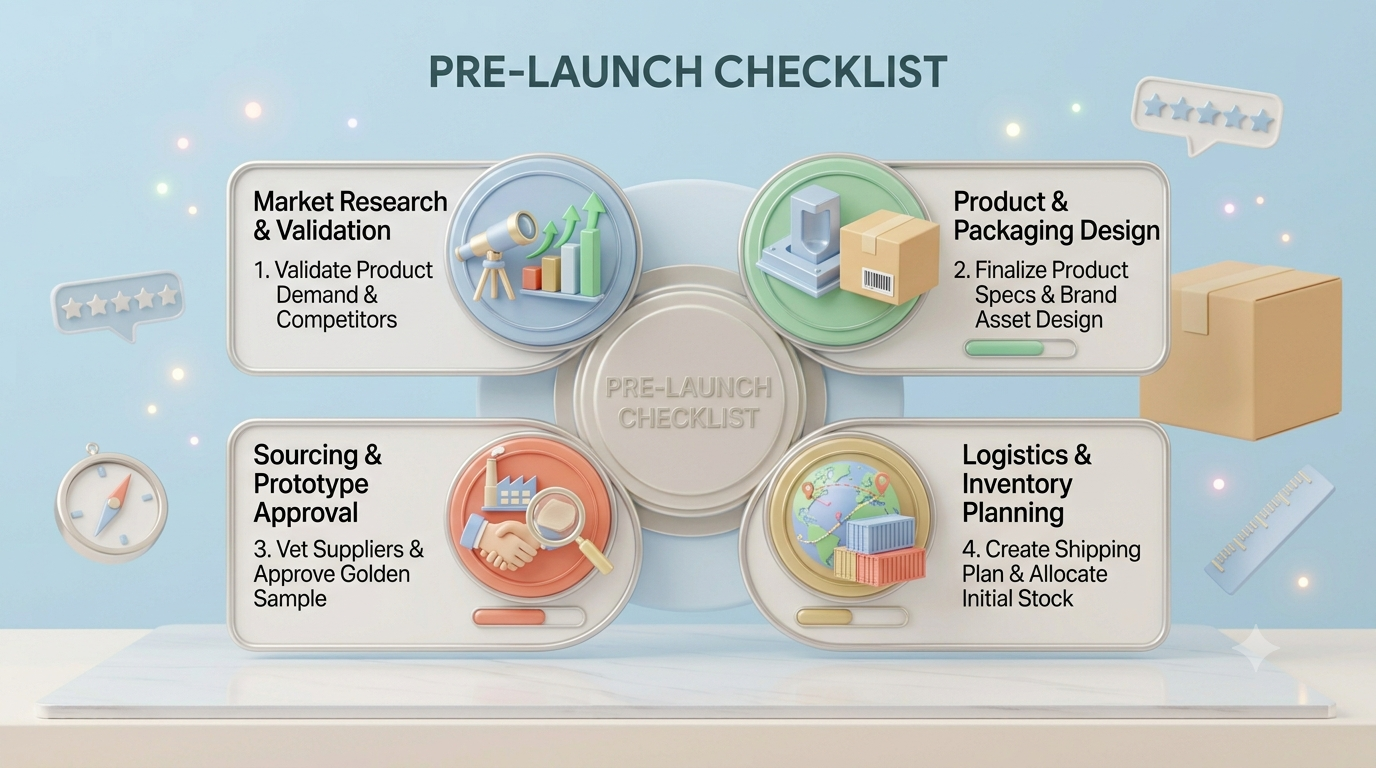
Nothing below works if the listing isn’t ready. Run through this Amazon product launch checklist before you send a single click:
- Inventory landed and checked in, with at least 8–10 weeks of cover at your realistic sell-through rate
- Seven images minimum, including a lifestyle shot, an infographic, and a size or scale reference
- Title, five bullets, and backend search terms mapped to your main keyword set
- A+ Content live (Brand Registry required)
- Pricing set with room to absorb a launch discount without going underwater
- A review path in place, whether that’s Vine, a product insert, or Amazon’s “Request a Review” button
- Buy Box confirmed and no listing suppressions or variation errors
If three or more of these are missing, delay the launch. A week of prep beats a month of damage control.
Days 1–7: Get Indexed and Prove the Listing Converts
The first week isn’t about volume. It’s about telling Amazon what your product is and confirming that people who land on the page actually buy.
What you’re doing
Turn on one Sponsored Products auto campaign and one manual exact campaign built around 10–15 core keywords. Keep budgets modest. You’re buying data, not sales. Price slightly under your target so conversion rate has a fighting chance, and drive your own traffic from email, social, or an existing customer list if you have one.
Check indexing by searching your ASIN plus an exact keyword phrase. If you don’t show up, the keyword isn’t in your listing properly yet.
KPIs to watch
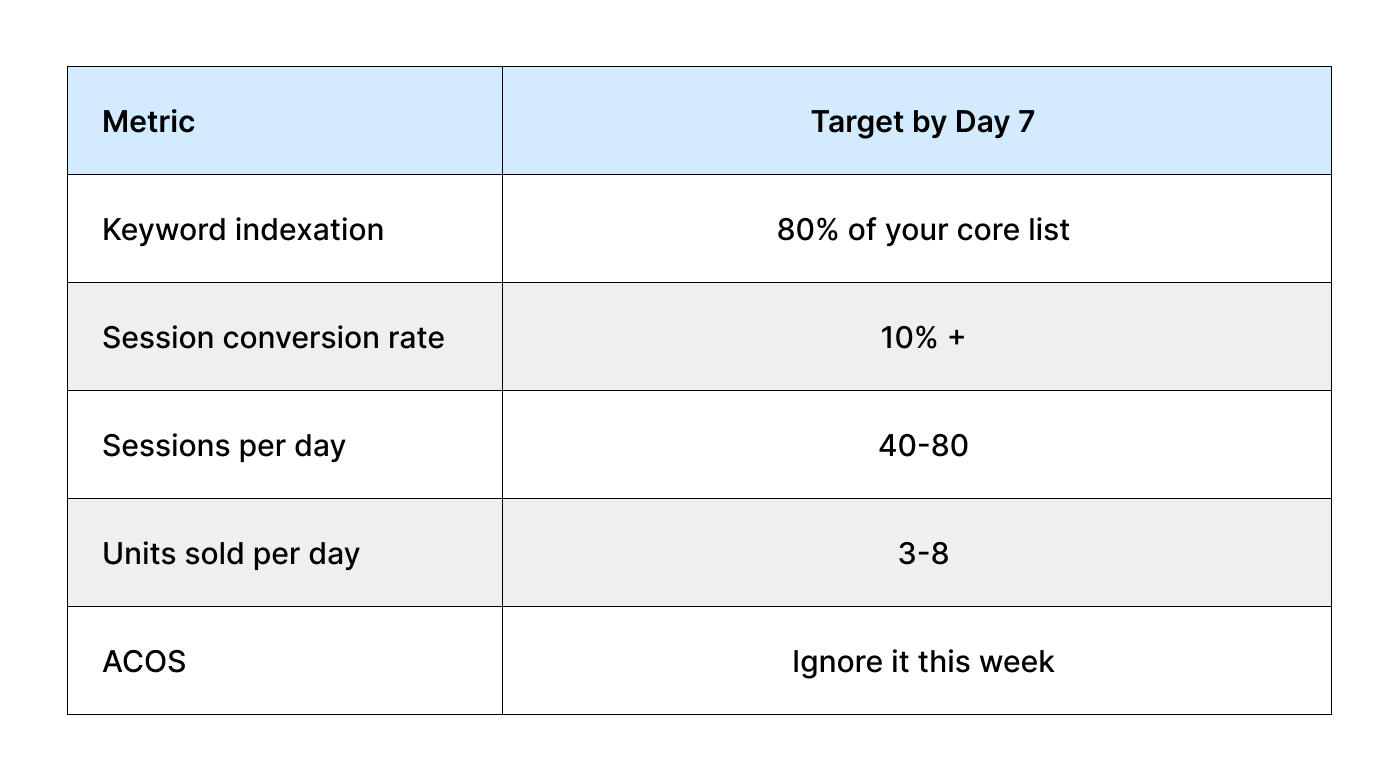
That last row matters. Chasing ACOS in week one is the single most common way to stall a launch before it starts. You’re paying for placement and data right now.
Red flag: sessions are fine, but conversion sits under 6%. That’s a listing problem, not a traffic problem. Fix the main image or the price before you spend another rupee on ads.
Days 8–14: Build Velocity and Bank Your First Reviews
Now you’re feeding the algorithm. Sales velocity in this window does more for Amazon product ranking than almost anything else you’ll do all month.
What you’re doing
Pull the search term report from your auto campaign and move the converting terms into exact match. Kill the obvious waste. Raise bids on the keywords that are actually producing orders, even if it stings.
Push hard on reviews. Enroll in Vine if you’re eligible, and send review requests on every delivered order. Five honest reviews at 4.3 stars will outperform zero reviews every time, and the conversion lift is immediate.
Watch your organic position on your top three keywords daily. Write it down. Page movement is the clearest sign your Amazon launch strategy is working.
KPIs to watch
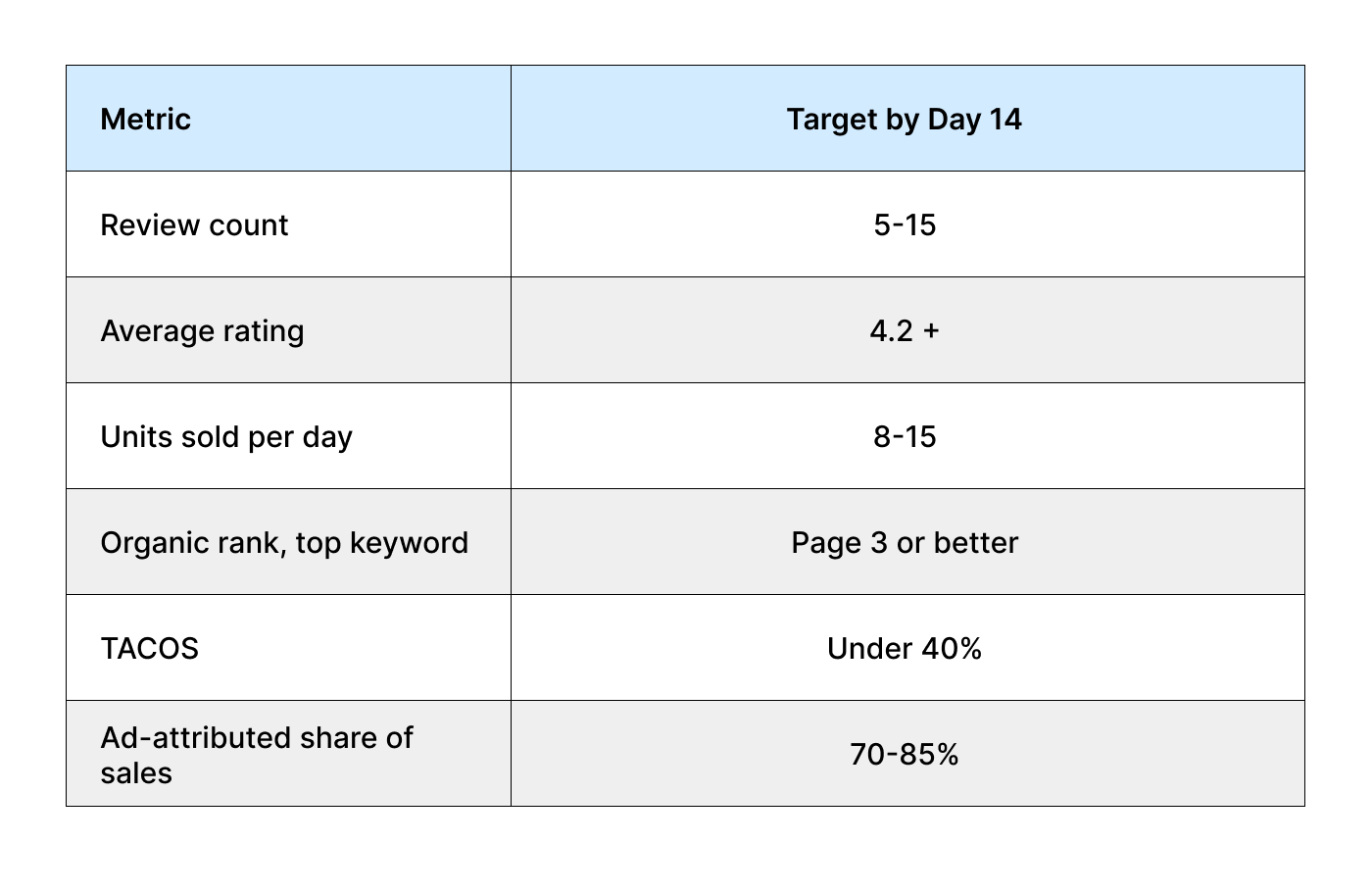
That last number should be high right now. If most of your sales are coming from ads in week two, that’s normal. It’s week four when it becomes a problem.
Days 15–21: Scale What Works, Cut What Doesn’t
This is where a good Amazon product launch strategy separates itself from a hopeful one. You have real data now. Use it.
What you’re doing
Expand into new campaign types. Add Sponsored Brands if you have Brand Registry, and turn on Product Targeting against competitor ASINs that show up in your category. Test a small Sponsored Display retargeting budget.
Start easing the launch discount up toward your target price, five percent at a time. Watch conversion rate after each step. If it drops more than two points, you’ve moved too fast, so step back and hold for three days.
Prune your keyword list without mercy. Any term with 20+ clicks and no orders gets paused or bid down to almost nothing.
KPIs to watch
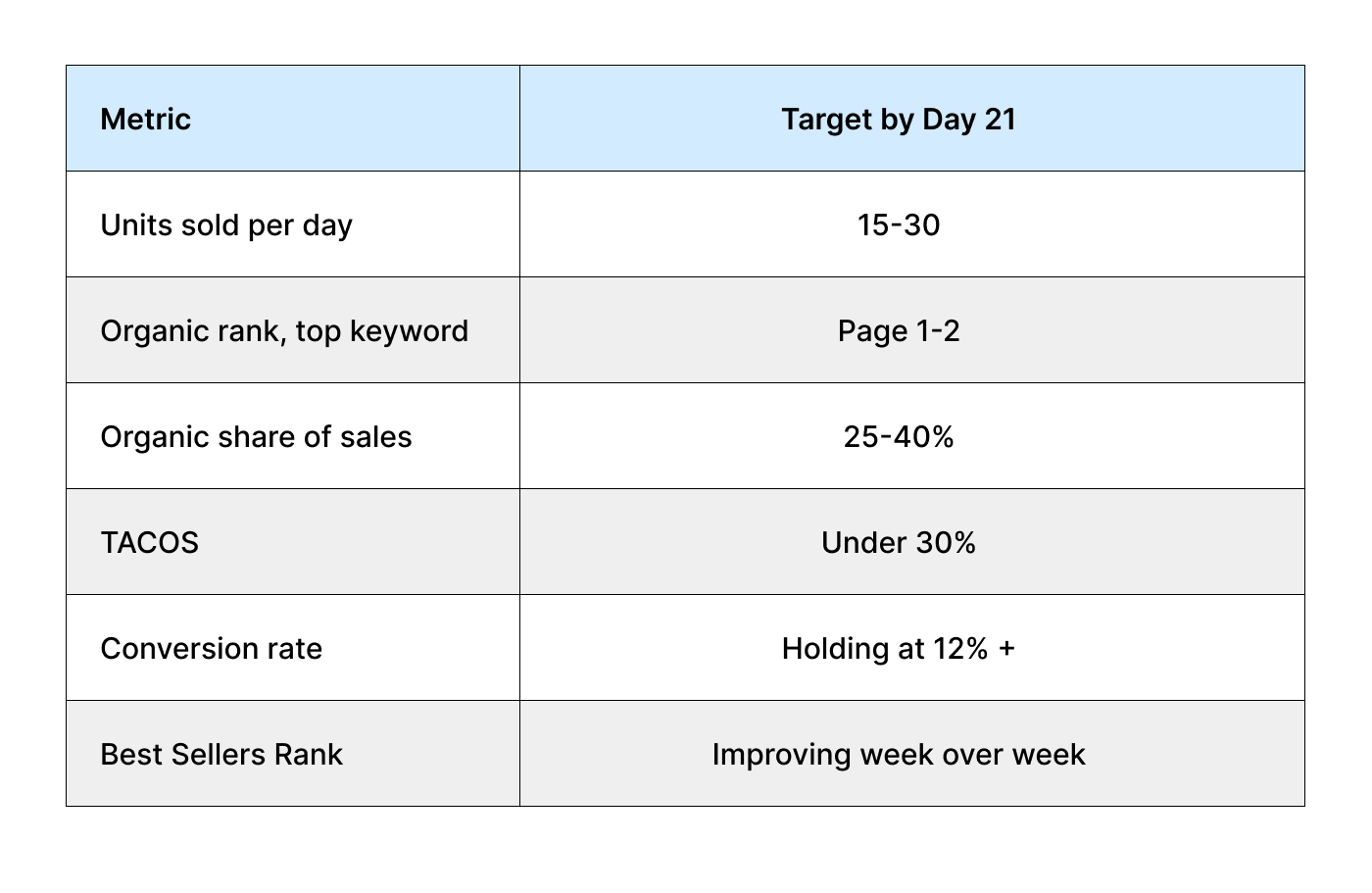
Red flag: sales are growing, but organic share isn’t. That means you’re renting traffic instead of earning a position. Check whether you’re actually ranking for the terms you’re bidding on, or just outbidding everyone on ad placements.
Days 22–30: Lock In Rank and Get Profitable
The last stretch is about proving the product can stand on its own. Anyone can buy sales for three weeks. The question is what happens when you ease off.
What you’re doing
Move to your full target price. Trim and spend deliberately, maybe 15–20% over the week, and see whether organic sales hold. If they do, you’ve genuinely built rank. If sales collapse, you are propping things up, and you need another two weeks of velocity before you back off.
Reorder inventory now. A stockout in week five undoes everything you built, and rank recovery after a stockout takes far longer than the stockout itself.
Set your baseline. Whatever your Day 30 numbers look like, those become the benchmark for the next 90 days.
KPIs to watch
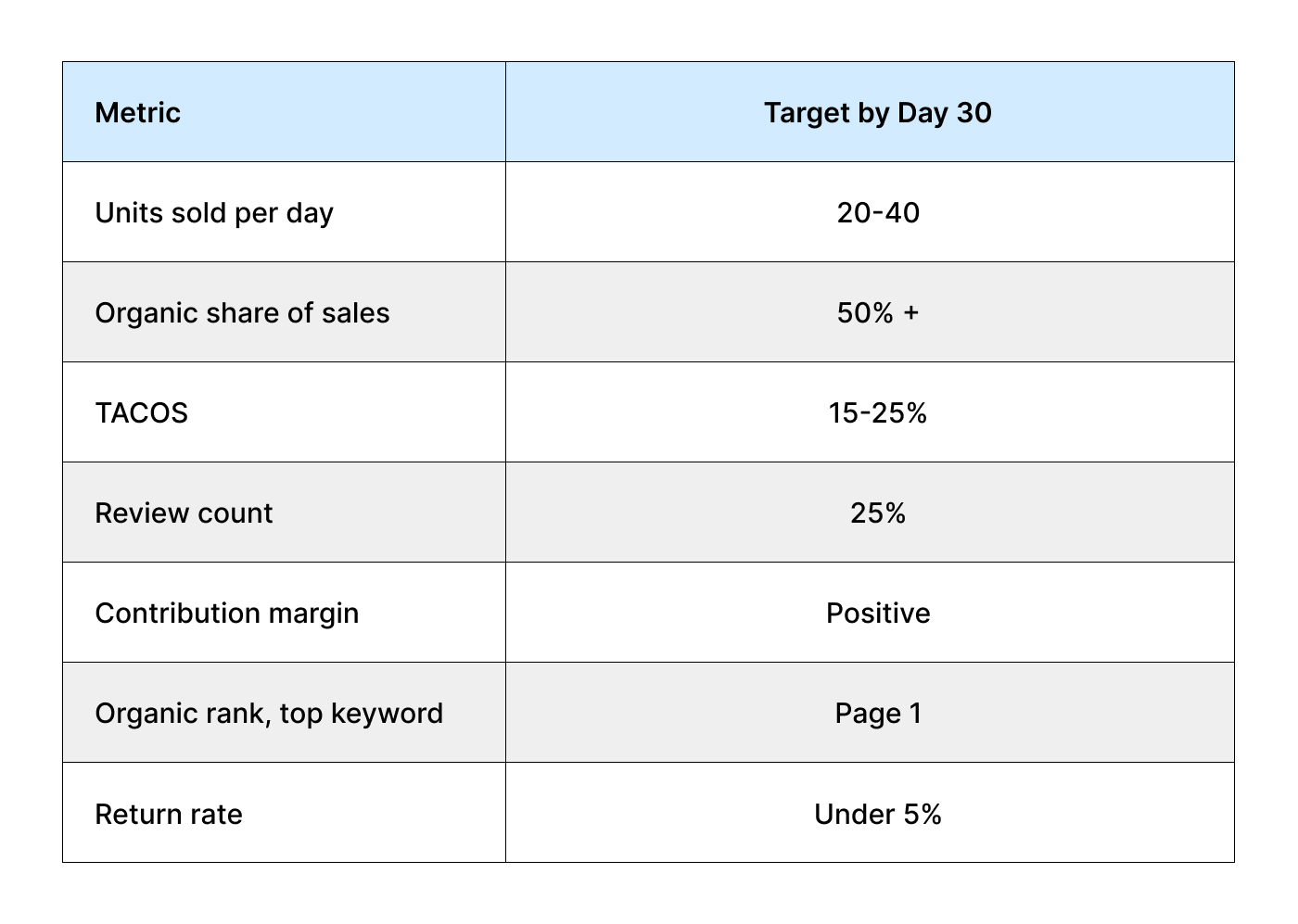
Hit most of those, and you have a product worth scaling. Miss on organic share specifically, and you have a product that needs more work before you pour money into it.
The Amazon Launch Metrics That Actually Predict Success
If you only track four things across the whole month, track these. Across hundreds of launches, these are the Amazon launch metrics that separate products that take off from products that quietly die:
- Session conversion rate. Below 8%, and nothing else you do will compound. This is the foundation.
- Organic share of sales. The percentage climbing week over week is the single best proof that your rank is real.
- Review velocity. Reviews per 100 units sold. Under 1 means your follow-up isn’t working.
- TACOS trend direction. The absolute number matters less than whether it’s falling. A TACOS of 35% heading down beats 25% heading up.
Where Most Launches Go Wrong
Cutting ad spend too early
Week two panic is real. Someone sees a 90% ACOS, slams the brakes, and kills the velocity that was about to earn them rank.
Launching without enough inventory
Going out of stock in week three is the most expensive mistake in this entire process. You lose rank, you lose review flow, and you restart almost from zero.
Spreading across too many keywords
Ten keywords with a real budget will always beat 200 with pocket change. Pick your battles.
Treating reviews as passive
If you’re not actively requesting them, you’ll sit at three reviews on Day 30 while a competitor who launched the same week has forty.
Changing everything at once
If you drop the price, swap the main image, and double bids on the same day, you learn nothing from the result.
How to Use This Scorecard
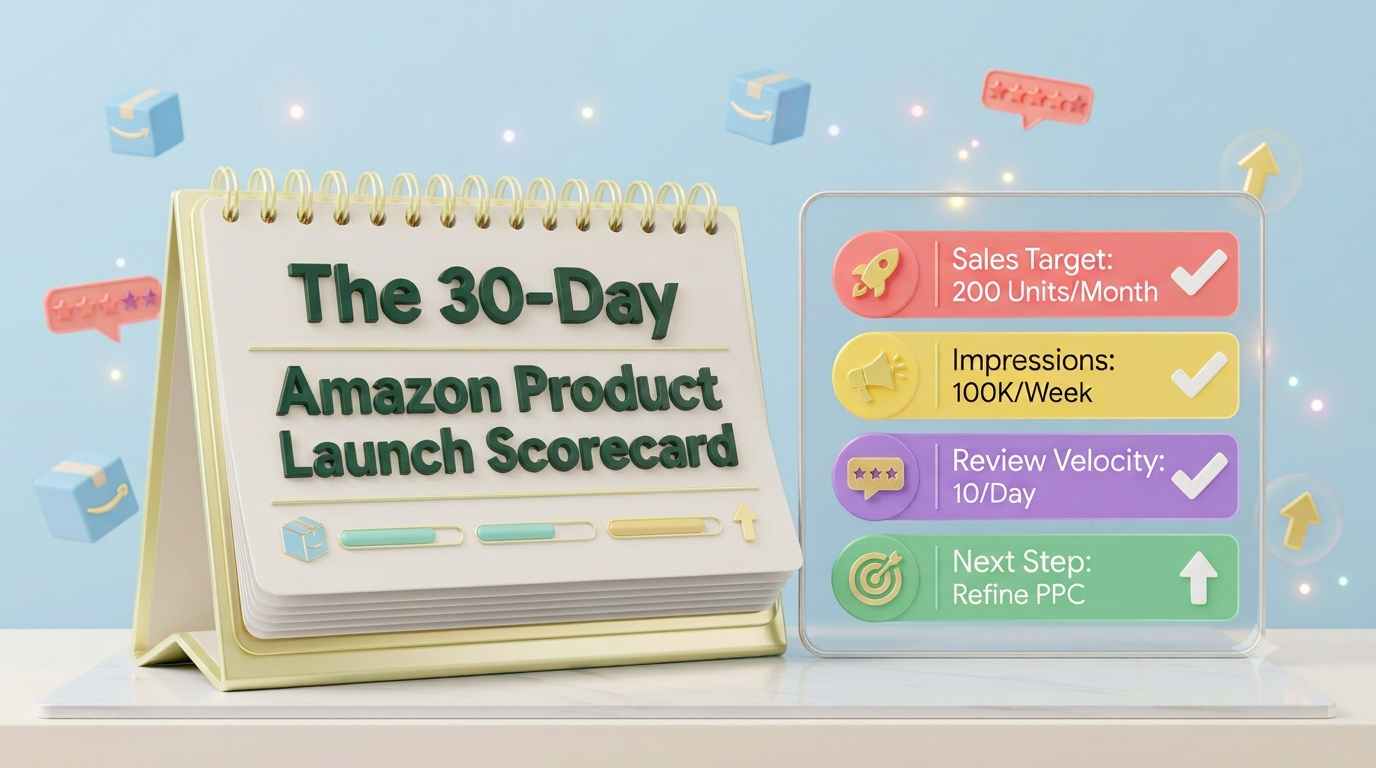
Print the four tables. On a Sunday basis, input your numbers for the week in the target columns and circle any number that you did not meet. Choose the greatest area of weakness to work on.
That’s it. You don’t need a dashboard with forty widgets. You need seven numbers, checked weekly, with one decision attached to each. Whether you’re about to launch a product on Amazon for the first time or you’re bringing your twentieth SKU to market, the discipline is the same.
FAQs
Scorecard
Honestly, it depends more on your category than your effort. In a niche category with weak competition, page one in three weeks is realistic. In something crowded like phone accessories or supplements, 60 to 90 days is more typical even when you do everything right. The 30-day window in this scorecard is about building momentum, not necessarily finishing the job.
Don’t panic, but do diagnose. Low sessions are a traffic problem, so raise bids or widen your keywords. Low conversion with decent sessions is a listing problem, so look at your main image, price, and review count. The worst response is to keep spending while hoping it self-corrects.
They’re less effective than they used to be. Amazon weights the conversion signal from deeply discounted or free units much lower now, and you can burn real money for very little rank. A moderate launch discount of 10 to 15%, leaving you just below break-even, beats out a 70% discount by far.
Guideline: budget advertising costs roughly equal to 30–50% of your forecasted first month’s revenue. This means a figure anywhere from $1,500 to $5,000 for the majority of small sellers. If this amount gives you a headache, then start with fewer keywords and a more focused strategy.
You can, but I’d advise against it if you’re new. Managing one launch properly takes maybe an hour a day. Three at once and you’ll end up checking in twice a week, which is exactly when problems compound. Stagger them by two or three weeks each instead.
You shift from launch mode to growth mode. That means less daily monitoring, more structural work like expanding your keyword coverage, testing new images, adding variations, and building outside traffic. The habits stay the same. The cadence just slows from daily to weekly.
Yes, but move the timeline forward. Start your 30 days about six to eight weeks before your season peaks, so you enter peak demand already ranking rather than trying to launch into the rush. Launching during peak means competing for ad placement at the most expensive moment of the year.